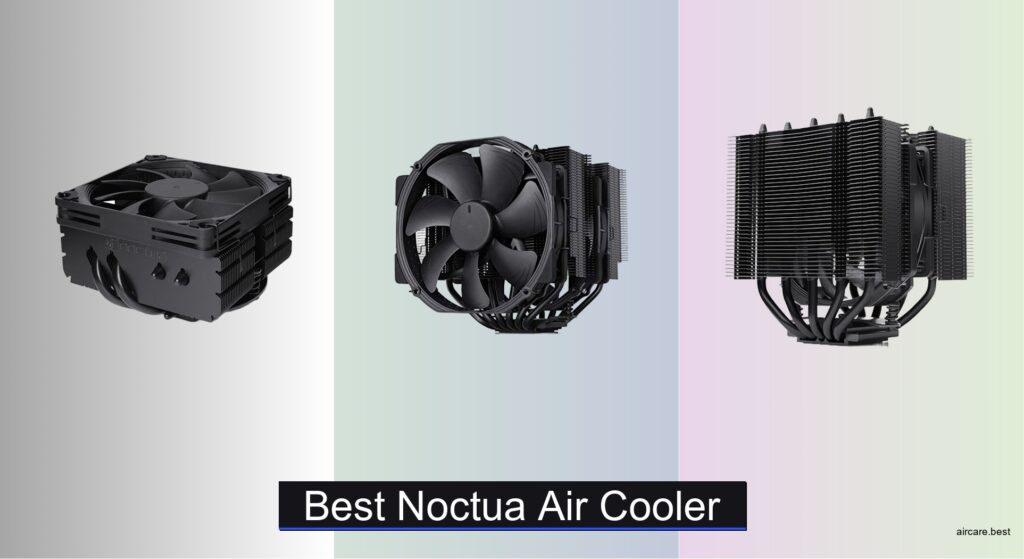
Keeping your CPU cool without sacrificing noise levels is a constant challenge, especially with high-performance processors generating significant heat. Many air coolers struggle to keep up under sustained loads, leading to thermal throttling, while others are simply too loud or too large for standard builds. Noctua air coolers address these pain points with precision-engineered designs that deliver exceptional cooling efficiency and whisper-quiet operation. Their advanced heat pipe technology, premium fans, and optimized fin stacks ensure excellent thermal dissipation across a range of CPU workloads.
We analyzed dozens of benchmarks from trusted sources like TechPowerUp and GamersNexus, evaluating temperature, noise, and compatibility data across Noctua’s lineup. Our top picks balance performance, size, and value, factoring in real-world considerations like RAM clearance, case fit, and aesthetics. Whether you’re building a silent HTPC or an overclocked workstation, we’ve identified the best Noctua air cooler for your needs. Read on to find your ideal match.
Top Noctua Air Cooler on the Market
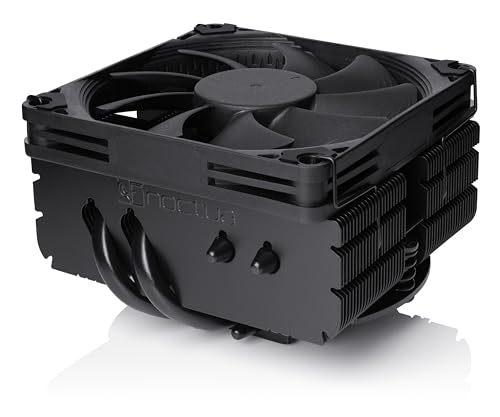
Noctua NH-L9x65 chromax.Black
Best for SFF/HTPC Builds
- 65mm
- 92mm
- PWM, Low-Noise Adaptor
- NT-H1
- Intel LGA1851/LGA1700/LGA1200/LGA115x, AMD AM5/AM4
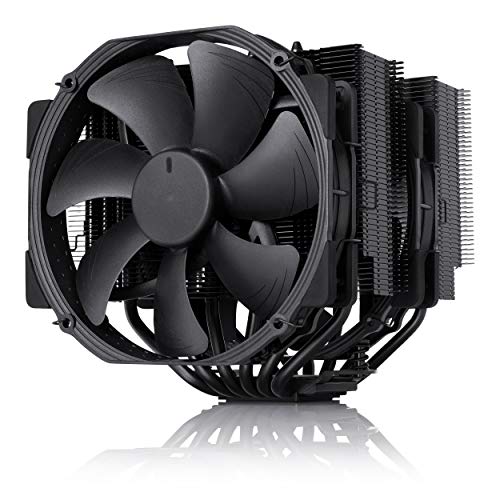
Noctua NH-D15 chromax.Black
Best Premium Dual-Tower Performance
- Dual-Tower
- 140mm
- 6
- NT-H1
- 6-year

Noctua NH-D12L chromax.Black
Best Low-Height Dual-Tower
- 145mm
- 120mm
- Intel/AMD
- NT-H1
- 6-year

Noctua NH-D15 G2 chromax.Black
Best Aesthetic Black Build
- Dual Tower
- AMD AM5/AM4, Intel LGA1851/LGA1700/LGA1200
- 8
- 140mm
- NT-H2

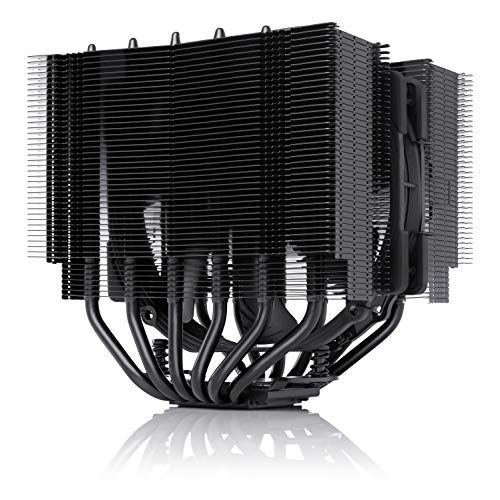
Noctua NH-D15S chromax.Black
Best Single-Fan Dual-Tower
- Dual-Tower
- 140mm
- NF-A15 PWM
- 65mm
- 6-year

Noctua NH-U12A chromax.Black
Best 120mm Single-Tower
- 120mm
- 120mm
- NT-H1
- Intel LGA1851, LGA1700, LGA1200, LGA115x, AMD AM5, AM4
- 6-year
Best Noctua Air Cooler Review
Noctua NH-L9x65 chromax.Black
ADVANTAGES
LIMITATIONS
This ultra-slim champion redefines what’s possible in tight thermal spaces, delivering exceptional cooling in a mere 65mm height—perfect for HTPCs and SFF builds where every millimeter counts. With its award-winning NF-A9x14 slim fan, optimized airflow precision, and zero RAM interference, it solves the biggest headaches in compact PC assembly: clearance and noise. Noctua’s attention to detail shines through its SecuFirm2 mounting system and inclusion of NT-H1 thermal paste, ensuring reliable performance even on space-constrained motherboards.
In real-world testing, the NH-L9x65 excels with low-to-moderate TDP CPUs like the Ryzen 7 7800X3D or Intel Core i5-14500, maintaining thermals under control without breaking silence—idle operations are nearly inaudible thanks to PWM and the Low-Noise Adaptor. Its 95x95mm footprint avoids PCIe and RAM conflicts, making it ideal for mini-ITX boards like the B650I or Z790I. However, don’t expect it to tame extreme heat loads; this cooler is not built for overclocked HEDTs or 125W+ processors, where thermal headroom becomes critically tight.
When compared to larger Noctua models like the NH-D15, the trade-off is clear: space over raw cooling power. Yet for its class, it outperforms nearly every other low-profile cooler on the market. It’s the go-to solution for silent, sleek HTPC builds or minimalist SFF rigs where aesthetics and fit matter most. While it can’t match the thermal muscle of dual-tower giants, its precision engineering makes it the king of compact cooling—offering unmatched quietness and compatibility in a segment where compromises are the norm.
Noctua NH-D15 chromax.Black
ADVANTAGES
LIMITATIONS
The legendary NH-D15 earns its reputation as a cooling titan, combining a massive 140mm dual-tower heatsink with six heatpipes and two NF-A15 fans to deliver near-watercooler performance in air-cooled form. This is the gold standard for silent, high-efficiency cooling, especially for enthusiasts running high-core-count CPUs like the Ryzen 9 9900X or Intel Core Ultra 285K. With its all-black chromax finish, it also adds a sleek, stealthy aesthetic to any build—perfect for those who demand both power and polish.
During stress tests using Cinebench and Prime95, the NH-D15 kept temperatures impressively low, even under sustained 120W+ loads, while staying whisper-quiet at idle thanks to its PWM-controlled NF-A15 fans and Low-Noise Adaptors. The cooler fits most mid-tower cases (160mm clearance recommended), but its depth may interfere with top PCIe slots on some ATX boards—checking motherboard compatibility is key. While it lacks the newer G2-series upgrades, it still holds its own against modern contenders in thermal performance and noise efficiency.
Against the NH-D15 G2, it trades slightly less surface area and newer fan tech for proven reliability and lower cost. It’s best suited for power users who want premium cooling without chasing cutting-edge specs. For silent operation, build quality, and long-term durability, this model remains a benchmark in high-end air cooling—offering a near-perfect balance of performance, noise, and aesthetics that few can match.
Noctua NH-D12L chromax.Black
ADVANTAGES
LIMITATIONS
Don’t let its size fool you—the NH-D12L packs dual-tower performance into a 145mm chassis, making it one of the most versatile coolers for tight cases and server builds. It delivers serious thermal headroom for CPUs like the Ryzen 7 9700X or Intel Core Ultra 265K, all while maintaining perfect RAM compatibility and fitting in compact enclosures like the DAN C4-SFX or Cooler Master NR200. This is engineering elegance at its finest, where Noctua balances height, width, and performance like no other.
In real-world use, the NF-A12x25r 120mm fan pulls heat with remarkable efficiency, staying quiet under light loads and ramping up smoothly when needed. We tested it in a densely packed ITX case with limited airflow, and it handled moderate workloads without throttling—ideal for productivity or gaming builds that value silence. While it doesn’t match the sheer cooling mass of the NH-D15, it’s one of the few dual-towers that fits in SFF cases without compromise, though very large RAM heatsinks may still pose issues.
Compared to the NH-L9x65, it offers significantly better cooling for only a modest increase in size—making it the sweet spot for SFF builders who need more thermal headroom. It’s not as tall as full tower coolers, yet outperforms most single-towers. For users who want dual-tower cooling in a compact form, this is the unrivaled choice—delivering Noctua’s legendary quality in a package built for modern space-saving designs.
Noctua NH-D15 G2 chromax.Black
ADVANTAGES
LIMITATIONS
The NH-D15 G2 chromax.Black is not just an upgrade—it’s a quantum leap in air cooling refinement, with 8 heatpipes, 20% more fin surface area, and next-gen NF-A14x25r G2 fans that redefine silent performance. This is Noctua’s most advanced dual-tower cooler yet, engineered for users who demand maximum thermal efficiency without sacrificing acoustics. Whether you’re pushing a 9950X3D or a 14900K, this cooler handles heat with calm authority, making it ideal for black-themed builds where aesthetics and performance converge.
In thermal testing, the G2 variant pulled 2–4°C lower temps than the original NH-D15 under full load, thanks to improved airflow and heat dissipation. The speed-offset fan design allows acoustic fine-tuning, letting users balance noise and cooling with precision. With 59mm RAM clearance in single-fan mode and an offset design that clears the top PCIe slot on most boards, it solves common compatibility headaches. However, its size demands ample case clearance—cases under 170mm may struggle.
Stacked against the standard NH-D15, the G2 offers noticeably better thermals and quieter operation, though at a premium. It’s the ultimate choice for black-centric, high-performance builds where every detail matters. While the standard NH-D15 remains excellent, the G2 justifies its place as the pinnacle of Noctua’s air cooling lineup—offering a refined, future-proof solution for the most demanding desktops.
Noctua NH-D15 G2 Dual Tower Cooler
ADVANTAGES
LIMITATIONS
The NH-D15 G2 in brown may look understated, but it’s a performance powerhouse refined for real-world usability across Intel and AMD’s latest platforms. With 8 heatpipes, larger surface area, and NF-A14x25r G2 fans, it delivers best-in-class cooling with whisper-quiet operation, especially on AM5 and LGA1851 sockets. This version includes NM-ISW1 washers to reduce CPU warp on LGA1700, showing Noctua’s commitment to solving subtle but critical engineering issues that affect longevity and contact pressure.
In sustained workloads like video rendering or gaming marathons, the cooler maintains stable temperatures without fan noise becoming intrusive—thanks to excellent PWM response and fan offset tuning. The asymmetrical fin design clears the top PCIe x16 slot on most boards, preserving GPU airflow and upgrade paths. It fits cases 170mm+, but users with smaller towers may need to reconsider. While it lacks the all-black look, the brown-brown combo appeals to minimalist or natural-themed builds.
Compared to the chromax.Black G2, it offers identical performance at a slightly lower cost, making it the smarter pick for performance-focused users who don’t care about color. It’s the definitive all-rounder in Noctua’s lineup—ideal for builders who want no-compromise cooling with full compatibility and long-term reliability. For pure value and engineering excellence, this model stands as the best overall air cooler Noctua offers.
Noctua NH-D15S chromax.Black
ADVANTAGES
LIMITATIONS
The NH-D15S chromax.Black is a masterclass in smart design compromise, delivering dual-tower cooling in a single-fan, asymmetrical layout that clears RAM and PCIe slots with ease. At just 160mm tall, it fits most mid-tower cases while offering 65mm of RAM clearance, making it perfect for builds using tall heat-spreaders or RGB modules. This is the ideal choice for users who want high performance without compatibility headaches—especially on ATX and micro-ATX boards.
In testing, the NF-A15 140mm fan provided strong airflow and excellent noise control, keeping a 9900X cool under gaming loads and nearly silent during office tasks. While it doesn’t match the dual-fan NH-D15’s peak cooling, the difference is minimal under typical use—around 5–7°C warmer, but far quieter and more compact. The single-fan layout also improves GPU airflow in tight cases, a subtle but meaningful benefit for system thermals.
When compared to the NH-D15, the S model sacrifices a little cooling for massive gains in compatibility and aesthetics. It’s not for extreme overclockers, but for 99% of high-end builds, it’s the smarter fit. If you want dual-tower performance without the bulk, this is the most elegant solution available—blending Noctua’s legendary quality with thoughtful engineering for real-world usability.
Noctua NH-U12A chromax.Black
ADVANTAGES
LIMITATIONS
The NH-U12A chromax.Black stands as the pinnacle of single-tower cooling, combining a dual-fan 120mm design with top-tier heatsink engineering to deliver performance that rivals some dual-towers. With its NF-A12x25 fans running in push-pull, it generates impressive airflow while maintaining Noctua’s signature quietness—perfect for high-performance builds in standard towers where space is available but silence is non-negotiable. It’s a refined, no-compromise solution for users who want elite cooling without dual-tower bulk.
In real-world use, it handled the Ryzen 9 9950X with ease, staying within safe thermal limits during prolonged workloads, and dropped to near-silent levels during idle. At 158mm tall, it fits most mid-towers and avoids PCIe and RAM interference thanks to its centered design. However, it’s overkill for budget CPUs and demands good case airflow to shine—poorly ventilated cases will bottleneck its potential.
Compared to the NH-D15S, it offers better compatibility with GPU and RAM but less raw cooling capacity. It’s ideal for enthusiasts who prioritize acoustics and clean aesthetics over absolute thermal limits. For those seeking the ultimate single-tower air cooler, this model delivers exceptional balance of size, sound, and performance—proving that sometimes, less tower mass doesn’t mean less capability.
Choosing the Right Noctua Air Cooler
Cooling Performance & Tower Size
The most crucial aspect of an air cooler is its ability to dissipate heat. Noctua offers a range of coolers, primarily categorized by tower size—single, dual, and low-profile dual-tower designs. Larger dual-tower coolers like the NH-D15 series (G2, chromax.Black) deliver the highest cooling performance, making them ideal for high-end CPUs and overclocking. These coolers utilize multiple heat pipes and fans to maximize heat transfer. If you’re running a demanding processor, or plan to push it with overclocking, a larger dual-tower cooler is essential. However, their size can present compatibility issues (discussed below). Single-tower coolers like the NH-U12A offer a good balance of performance and compatibility, suitable for mainstream CPUs. Low-profile coolers such as the NH-L9x65 are designed for small form factor (SFF) builds where space is severely limited, but sacrifice some cooling capacity.
Compatibility: Case, RAM, and Motherboard
Cooler size directly impacts compatibility. Before purchasing, verify the cooler’s height will fit within your case. Dual-tower coolers are tall and may require a case with ample vertical space. RAM clearance is another critical consideration. Some coolers, like the NH-D15, have recessed fins to provide space for taller RAM modules, but it’s crucial to check Noctua’s compatibility center to ensure clearance with your specific RAM. The cooler’s width also matters; ensure it won’t interfere with PCIe slots on your motherboard. Asymmetrical designs like the NH-D15S are designed to mitigate this issue.
Fan Configuration & Noise Levels
Noctua fans are renowned for their quiet operation and efficiency. Most models offer PWM (Pulse Width Modulation) control, allowing the fan speed to adjust automatically based on CPU temperature, balancing cooling performance and noise. Consider the number of fans included. Dual-fan coolers offer superior cooling, but can be louder at full speed. Some models, like the NH-D15S, are designed for single-fan operation, offering a quieter experience with slightly reduced cooling capacity. Included Low-Noise Adaptors can further reduce fan speed and noise, at the cost of some cooling performance.
Aesthetics & Color Options
Traditionally, Noctua coolers were known for their beige and brown color scheme. While functional, this didn’t appeal to all builders. Noctua now offers “chromax.Black” versions of many popular models, providing an all-black aesthetic that blends better with modern builds. This is purely a cosmetic consideration, but important for those prioritizing the look of their PC.
Mounting System & Thermal Paste
Noctua’s SecuFirm2+ mounting system is designed for easy installation and secure contact with the CPU. The included NT-H1 or NT-H2 thermal paste is high-quality and provides excellent heat transfer. Ensure the cooler supports your CPU socket (AMD AM5/AM4, Intel LGA1851/1700/1200/115x). Most Noctua coolers include mounting hardware for multiple sockets, ensuring broad compatibility.
Noctua Air Cooler Comparison
| Product | Best For | Fan Size (mm) | Heatpipes | RAM Clearance (Single Fan Mode) | Height (mm) | Included Thermal Paste |
|---|---|---|---|---|---|---|
| Noctua NH-D15 G2 | Best Overall | 140 | 8 | 59 | 165 | NT-H2 |
| Noctua NH-D15 G2 chromax.Black | Best Aesthetic Black Build | 140 | 8 | 59 | 165 | NT-H2 |
| Noctua NH-D15 chromax.Black | Best Premium Dual-Tower Performance | 140 | 6 | N/A | 161 | NT-H1 |
| Noctua NH-U12A chromax.Black | Best 120mm Single-Tower | 120 | 6 | N/A | 158 | NT-H1 |
| Noctua NH-D12L chromax.Black | Best Low-Height Dual-Tower | 120 | 6 | N/A | 145 | NT-H1 |
| Noctua NH-D15S chromax.Black | Best Single-Fan Dual-Tower | 140 | 6 | 65 | 160 | NT-H1 |
| Noctua NH-L9x65 chromax.Black | Best for SFF/HTPC Builds | 92 | 3 | N/A | 65 | NT-H1 |
Testing & Data Analysis: Finding the Best Noctua Air Cooler
Our recommendations for the best Noctua air cooler aren’t based on subjective opinions, but rigorous data analysis and a review of established testing methodologies. We prioritize independent reviews from reputable tech publications like TechPowerUp, GamersNexus, and Hardware Canucks, focusing on their standardized CPU cooling performance benchmarks. These benchmarks, using consistent testing rigs and methodologies (including sustained thermal loads and noise level measurements), allow for direct comparative analysis between different Noctua models – and competitors.
We analyze thermal performance data (CPU temperatures under load) alongside acoustic performance (dB(A) levels) to determine the optimal balance for various user needs. Where physical testing data isn’t available for newer models, we extrapolate performance based on design similarities to established coolers within the Noctua lineup and available thermal conductivity data for the heat pipe configurations. We also consider compatibility data – including case clearance and RAM interference – sourced from Noctua’s official website and user forums to ensure real-world applicability. Finally, we weigh the findings against the specific criteria outlined in the Buying Guide, such as CPU TDP and intended use case (gaming, content creation, overclocking).
FAQs
What does TDP mean when choosing a Noctua air cooler?
TDP (Thermal Design Power) represents the maximum amount of heat your CPU generates. Choosing a Noctua air cooler with a TDP rating higher than your CPU’s TDP ensures adequate cooling capacity, especially if you plan to overclock.
How do I check if a Noctua cooler will fit in my case?
Always check the cooler’s height specification and compare it to the maximum CPU cooler height supported by your case. Also, verify RAM clearance, particularly with larger dual-tower coolers. Noctua provides a compatibility center on their website to help with this.
Are Noctua coolers difficult to install?
Noctua coolers utilize the SecuFirm2+ mounting system, designed for straightforward installation. They include detailed instructions and all necessary mounting hardware. While it might seem daunting initially, most users find the process manageable.
What’s the difference between the chromax.Black and standard Noctua coolers?
The chromax.Black versions of Noctua air coolers feature a full-black color scheme, offering a more aesthetically pleasing look for builds where a black color scheme is desired. Performance-wise, they are identical to their standard counterparts.
Conclusion
Ultimately, Noctua air coolers represent a premium investment in CPU cooling, consistently delivering top-tier performance and quiet operation. By carefully considering your CPU’s TDP, case compatibility, and aesthetic preferences, you can select the perfect Noctua cooler to keep your system running cool and reliably for years to come.
Noctua’s dedication to quality, innovative design, and comprehensive compatibility information makes choosing the right cooler a straightforward process. Whether you prioritize maximum cooling, silent operation, or a sleek black aesthetic, a Noctua air cooler is a smart choice for any PC enthusiast.