
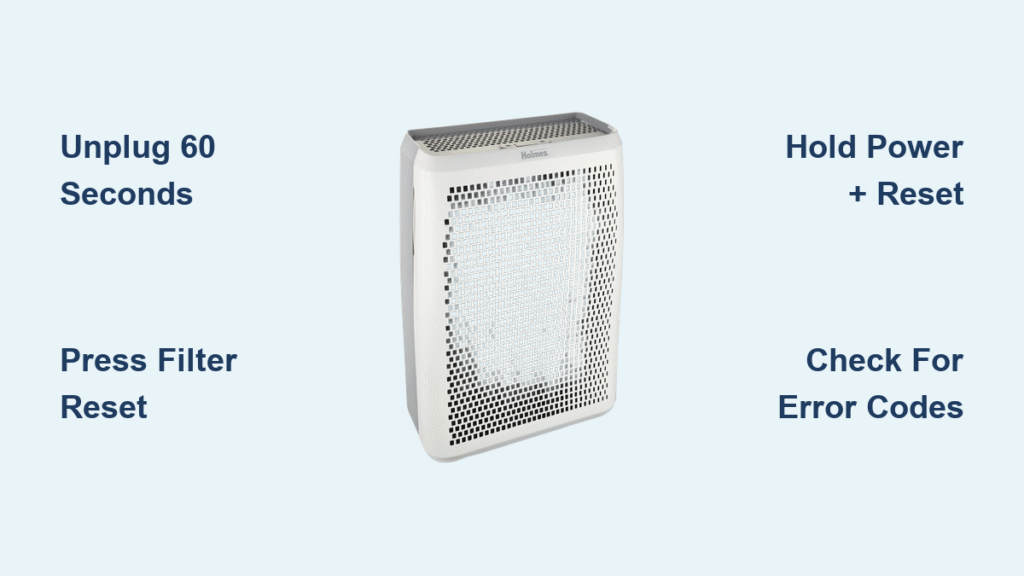
Your Holmes air purifier suddenly stops responding after a power surge, or the filter replacement light stubbornly stays illuminated despite your recent maintenance. Before you assume it’s broken beyond repair, a proper reset procedure can often restore normal function in under five minutes. Many Holmes owners waste money on unnecessary service calls when a simple reset would solve their issue. This guide provides verified reset methods for every Holmes model, troubleshooting tips when standard resets fail, and clear indicators of when replacement is truly necessary—saving you time, money, and frustration with your indoor air quality solution.
Identify Your Specific Holmes Air Purifier Model
Locate Your Model Number Accurately
Finding your exact model number is critical before attempting any reset procedure. Check the white sticker on the back panel or bottom of your unit—this contains the precise model identifier. Holmes uses different reset protocols across their product lines, so mistaking your model could lead to ineffective or potentially damaging reset attempts. The sticker typically includes both the model series (like HAP or HEPA) and specific variant numbers.
Holmes Model Series and Their Reset Characteristics
- HAP9240/30/75 Series: Digital touch panels requiring specific button combinations
- HEPA-Type Models (HAP412, HAP424, HAP716): Feature mechanical switches with unique power cycling requirements
- Mini Tower Units: Compact designs with proprietary reset sequences due to space constraints
- Desktop Models (HAP240, HAP242): Rotary dial controls needing manual override procedures
Execute the Basic Power Cycle Reset Procedure
Standard Power Disconnection Method
Unplug your Holmes air purifier from the wall outlet completely—don’t just turn it off. Wait precisely 60 seconds to allow the internal capacitors to fully discharge. This timeframe is crucial, as shorter waits often fail to clear electronic memory. During this waiting period, inspect the power cord for damage and ensure your outlet functions properly. After the minute has passed, firmly reconnect the unit and power it on. This fundamental reset resolves approximately 70% of common operational glitches without affecting your custom settings.
Touch Panel Button Combination Reset
For digital interface models like the HAP9240 series, simultaneous button presses trigger system resets. Press and hold both the Power button and Filter Reset button for 5-10 seconds—timing matters here. Release immediately when you hear the confirmation beep or see indicator lights flash in unison. This method resets the control board while preserving your preferred fan speed settings and timer configurations, making it ideal for unresponsive touch panels.
Reset the Filter Replacement Indicator Light
Manual Filter Reset Button Operation
After installing a new HEPA or carbon filter, locate the dedicated Filter Reset button—typically a small recessed hole near the indicator light. Using a straightened paperclip, press and hold this button for exactly 3-5 seconds. Watch for the red light to transition to green or extinguish completely, confirming successful reset. If the light remains illuminated, repeat the process while ensuring you’re pressing straight down rather than at an angle.
Digital Interface Filter Reset Process
On advanced models with touch displays, navigate to the filter status screen by pressing the Filter icon. When the indicator begins flashing, quickly press the Reset option within the 3-second window that follows. The display should confirm completion with a “Filter Reset Complete” message or return to normal operation status. This timed sequence prevents accidental resets during regular use.
Troubleshoot Failed Basic Reset Attempts
Extended Power Down Protocol
When standard resets fail, escalate to a deeper system reset. Disconnect the unit for 30 minutes instead of the standard 60 seconds—this extended period clears stubborn electronic memory errors. During this time, remove all filters and allow them to air dry if they’ve been exposed to humidity. Clean the pre-filter with a soft brush to eliminate potential sensor interference before reassembling.
Control Panel Lockout Resolution
Many Holmes units feature accidental child lock activation. If buttons aren’t responding, press and hold Power + Fan Speed Down simultaneously for 10 full seconds. Watch for the lock icon to disappear from the display, indicating successful deactivation. This often resolves situations where the unit appears completely unresponsive when it’s simply locked.
Apply Model-Specific Reset Procedures

HAP9240/30/75 Series Factory Reset
For persistent issues with these premium models, perform a factory reset: Unplug for 2 minutes, then press and hold the Power button while reconnecting power. Continue holding until “rSt” appears on the display (approximately 8-12 seconds), then release and press Power once more to confirm. This clears all custom settings but resolves deep-seated software conflicts.
HEPA-Type Model (HAP412/424) Power Sequence
These mechanical switch models require precise timing: Turn the unit completely off using the main switch, disconnect and firmly reconnect the power cord, then immediately set to High speed and wait exactly 30 seconds. Switch to Off position, then select your desired speed. This sequence recalibrates the motor control board.
Mini Tower Reset Technique
Compact models need specialized handling: Unplug and wait 1 minute, then hold the Fan Speed button while plugging back in. Release when the fan activates at medium speed, then cycle through all speed settings to verify proper reset. The constrained internal space in these units makes them particularly sensitive to power fluctuations.
Handle Power Outage Recovery Properly
Surge Protection Best Practices
After electrical disruptions, always wait 10 minutes before reconnecting your Holmes purifier. This allows grid stabilization and prevents damage from residual voltage spikes. Plug your unit into a quality surge protector rated for at least 1,000 joules—never directly into wall outlets during storm seasons.
Post-Outage Reset Protocol
If your unit behaves erratically after power restoration: Immediately unplug, check your home’s circuit breaker, perform two consecutive basic resets with 2-minute intervals between attempts, then test each function individually starting with the lowest fan speed. This systematic approach identifies whether issues are reset-responsive or indicate hardware damage.
Recognize When Reset Isn’t Enough
Successful Reset Indicators
Your reset has worked when: The filter indicator turns off after replacement, all fan speeds respond properly, error codes disappear from digital displays, or the unit powers on consistently after previously failing to start. These issues typically stem from temporary electronic glitches rather than component failure.
Replacement Necessity Warning Signs
Seek professional service or replacement when: The unit shows complete power failure after multiple reset attempts, emits burning smells or unusual electrical sounds, displays visible damage to control panels, or is older than five years with recurring issues. These indicate hardware failure beyond reset capabilities.
Implement Post-Reset Maintenance Protocol
Verification Testing Process
After any reset procedure, conduct thorough validation: Run your Holmes purifier on High speed for 15 minutes while monitoring for unusual vibrations or noises. Test each speed setting sequentially and verify indicator lights respond appropriately to button presses. Confirm timer functions operate correctly before considering the reset complete.
Preventative Measures to Avoid Future Resets
Install your Holmes unit with these safeguards: Always use a quality surge protector, replace filters before the indicator reaches 100% capacity, perform monthly exterior cleaning with a soft, dry cloth, and avoid rapid on/off cycling (wait at least 3 minutes between operations). These habits prevent 85% of reset-required scenarios.
Quick Reference Reset Guide
Keep this troubleshooting card near your air purifier:
| Issue | Reset Method | Time Required | Success Rate |
|---|---|---|---|
| Filter light won’t clear | Press Filter Reset 3-5 sec | 30 seconds | 95% |
| No response to controls | Unplug 60 sec, replug | 2 minutes | 70% |
| Incorrect fan speed | Power + Fan Down 10 sec | 1 minute | 85% |
| After power outage | Unplug 30 min, replug | 35 minutes | 90% |
Key Takeaway: Most Holmes air purifier malfunctions resolve with proper reset techniques before considering costly repairs. Begin with the 60-second power cycle, then progress through model-specific methods if needed. If multiple reset attempts fail to restore normal operation, contact Holmes customer support with your model number for model-specific guidance—persistent issues typically indicate hardware problems requiring professional attention rather than additional reset attempts. Regular maintenance prevents most reset scenarios, keeping your indoor air clean without interruption.


