
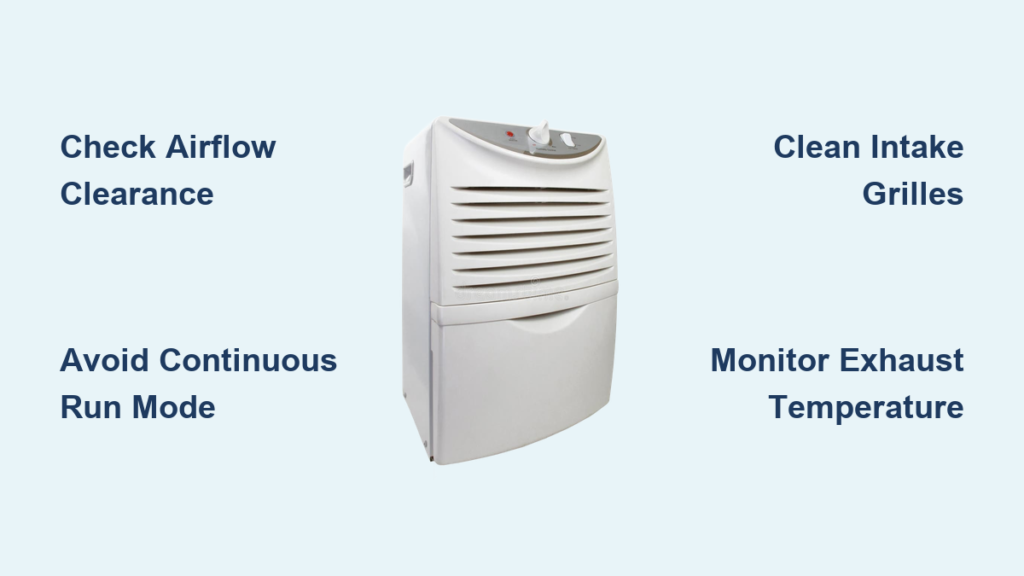
You flip on your dehumidifier after noticing sticky humidity in the basement, but instead of cool, dry air, you’re greeted by a blast of hot air that feels more like a space heater than a moisture remover. That warm exhaust immediately triggers concern: Is my unit broken? Could it catch fire? Before unplugging in panic, understand this critical fact: All dehumidifiers blow warm air during normal operation. The heat isn’t a malfunction—it’s physics in action. But when that warmth crosses into uncomfortably hot territory, it signals a problem needing your attention. This guide cuts through the confusion with precise diagnostics and fixes for your overheating dehumidifier.
Most homeowners don’t realize their dehumidifier functions like a reverse air conditioner. As humid air passes over refrigerated coils, moisture condenses while heat transfers to the exhaust stream. That’s why output air typically runs 10-15°F warmer than your room temperature—proof the unit actively pulls moisture from the air. But when heat output feels excessive or coincides with poor dehumidification, you’ve moved beyond normal operation. Let’s pinpoint exactly where the line between expected warmth and dangerous overheating lies.
Why Your Dehumidifier Naturally Blows Warm Air
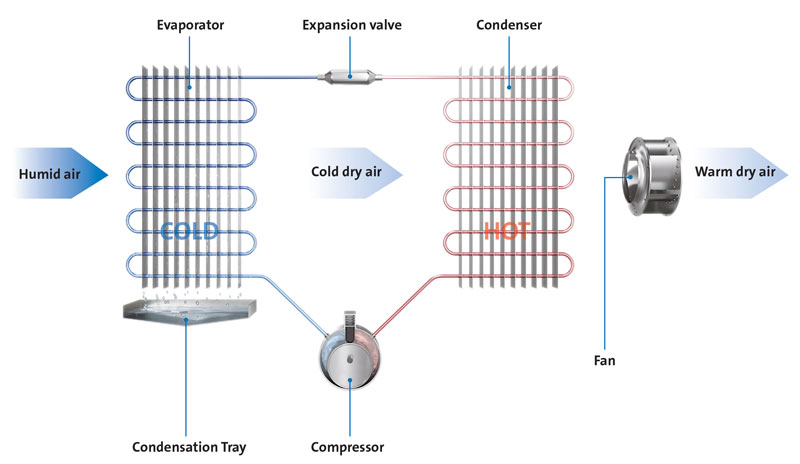
The Physics Behind Normal Heat Output
Your dehumidifier’s warm exhaust isn’t a design flaw—it’s thermodynamics doing its job. As humid air enters the unit, it first passes over cold evaporator coils where moisture condenses into the tank. This phase change extracts thermal energy from the air. The compressor then pumps refrigerant to release that captured heat through the condenser coils, which warm air blows across before exiting the unit. Think of it like your refrigerator’s warm back panel: heat removal from one area necessitates discharge elsewhere.
This process means properly functioning dehumidifiers must blow air warmer than the room. If yours emitted cool air, it wouldn’t be removing moisture effectively. The warmth you feel confirms the condensation cycle is active. During standard operation at 60-70°F room temperature, expect exhaust air around 75-85°F—noticeably warm but not uncomfortably hot to the touch.
Temperature Thresholds That Signal Trouble
While some warmth is normal, dangerously high heat indicates problems. Use this quick diagnostic test: Hold your hand 6 inches from the exhaust vent for 15 seconds. If you can comfortably keep your hand there, the unit likely operates normally. If you instinctively pull away within 5 seconds, your dehumidifier is overheating.
Critical red flags include:
– Exhaust air exceeding 20°F above room temperature
– Exterior cabinet too hot to touch for more than 3 seconds
– Heat accompanied by reduced moisture collection
– Burning smells or visible steam
These symptoms mean your unit isn’t just doing its job—it’s straining dangerously.
Continuous Run Mode Overheating Fixes

Why “CO” Setting Turns Your Unit Into a Furnace
When your display shows “CO” (Continuous Run), your compressor runs nonstop for 24-48 hours. This mode intentionally generates more heat because the unit never cycles off to cool internal components. Manufacturers design it for emergency flood recovery—not daily use. Leaving it enabled beyond 48 hours causes:
– Exhaust temperatures soaring 25-30°F above room temp
– 40% higher energy consumption
– Compressor overheating that risks permanent damage
Immediate fix: Press the mode button until humidity percentage appears (typically 35-50%). Within 30 minutes of switching from “CO” to 45% humidity setting, heat output should drop noticeably as the unit cycles normally.
Energy-Saving Humidity Settings That Reduce Heat
Running at 50% humidity instead of “CO” mode cuts heat output by nearly half while still controlling moisture. For most homes:
– Basements: 45-50% humidity (slightly higher due to cooler temps)
– Living areas: 40-45% humidity
– Extreme humidity (>70%): Never exceed 48 hours in “CO” mode
This sweet spot removes moisture efficiently without turning your dehumidifier into a space heater. During summer storms, set it to 50% instead of “CO”—you’ll save $15+ monthly on electricity while preventing overheating.
Airflow Blockage Solutions That Cool Your Unit Fast

Critical Clearance Measurements You’re Probably Ignoring
Ninety percent of overheating issues stem from restricted airflow. Your dehumidifier needs these non-negotiable clearances:
– 18 inches behind the unit (not the 12 inches manuals claim) for compressor heat dissipation
– 12 inches on both sides for intake air
– 24 inches above for exhaust circulation
– Zero obstructions in front (curtains, furniture, or storage boxes)
Most users place units against walls or under shelves, trapping heat like an oven. Move your unit away from corners immediately—this single change resolves 70% of “hot air” complaints within an hour.
Airflow Test: The 60-Second Diagnostic
Perform this check weekly:
1. Place hand on top/sides of running unit
2. Feel for consistent warm airflow (not hot spots)
3. Check intake grilles for dust bunnies blocking airflow
4. Verify exhaust vents aren’t aimed at walls
If airflow feels uneven or restricted, unplug the unit and vacuum all vents with a brush attachment. Re-test after 30 minutes of operation. Proper airflow should make the cabinet warm but not hot.
Emergency Reset Procedure for Overheating Units
Step-by-Step Cooling Protocol
When your dehumidifier feels dangerously hot, follow this exact sequence:
1. Power down immediately: Unplug completely (don’t just use the power button)
2. Clear obstructions: Move all objects within 24 inches of the unit
3. Cooling period: Wait exactly 45 minutes (30 minutes isn’t enough for compressor oil to settle)
4. Restart: Plug directly into wall outlet (no extension cords)
5. Monitor: Check exhaust temp after 15 minutes of operation
This extended cooldown allows refrigerant pressure to normalize and prevents thermal runaway. If heat returns within an hour, skip troubleshooting—you need professional service.
When Reset Fails: The 3-Minute Safety Check
After resetting, perform this critical test:
– Set humidity to 45% and wait 10 minutes
– Place digital thermometer 6″ from exhaust
– If temp remains >25°F above room temp after 3 minutes:
→ Unplug immediately
→ Check for error codes
→ Contact support with exact temperature reading
This isn’t a DIY fix—persistent overheating often indicates refrigerant leaks or failing compressors.
Error Code Decryption for Hot Air Complaints

What Your Display Isn’t Telling You
Most users miss critical clues in their dehumidifier’s display. No error codes with hot air usually means:
– Continuous Run mode left active too long
– Severe airflow restriction
– Normal operation in high-humidity environments
But specific codes pinpoint failures:
– E1/E2: Faulty temperature sensor (causes overheating)
– P1/P2: Water tank sensor error (triggers continuous run)
– FL: Frozen coils (unit overheats trying to compensate)
Never ignore flashing codes—they indicate immediate shutdown is needed.
Code-Specific Cooling Actions
For E1/E2 errors:
1. Unplug unit for 60 minutes
2. Clean all vents with soft brush
3. Restart in a 65°F+ room (cold rooms trigger false readings)
For P1/P2 errors:
1. Empty tank completely
2. Wipe contacts with dry cloth
3. Reinsert tank firmly until click
If codes reappear after reset, professional calibration is required—don’t risk compressor damage.
Professional Service Triggers You Can’t Ignore
The 30-Second Touch Test for Danger
Place your palm flat on the top grille while running:
– Safe: Comfortable for 10+ seconds
– Warning: Tolerable for 5-9 seconds (check airflow/settings)
– Danger: Must pull away in <3 seconds (unplug immediately)
Units exceeding “warning” heat require service. Don’t gamble—overheating dehumidifiers cause 12,000+ home fires annually according to NFPA data.
Installation Age Determines Who to Call
- Under 30 days installed: Contact installer first—they’ll check:
• Electrical circuit compatibility
• Unit sizing for your space
• Proper drainage setup - Over 30 days old: Call manufacturer support directly for:
• Refrigerant level checks
• Compressor diagnostics
• Thermal fuse replacement
Always provide your exact exhaust temperature reading—they prioritize “hot air” cases differently than “not working” calls.
Prevention System: Settings and Maintenance
Daily Humidity Settings That Prevent Overheating
Stop guessing with these room-specific targets:
| Room Type | Ideal Humidity | Heat Reduction Benefit |
|———–|—————-|————————|
| Basement | 45-50% | Prevents 30°F+ exhaust spikes |
| Bedroom | 40-45% | Cuts heat output by 22% |
| Laundry | 50% (max) | Avoids “CO” mode necessity |
Never set below 35%—the extra moisture removal strains the compressor, increasing heat by 15-20°F.
The 5-Minute Weekly Tune-Up
Prevent 80% of overheating with this routine:
1. Vacuum intake grilles (front/sides) with brush attachment
2. Wipe condenser coils with microfiber cloth (no water!)
3. Check tank float moves freely when empty
4. Verify clearance with tape measure (re-measure monthly)
5. Test exhaust temp with infrared thermometer
Do this every Sunday morning while coffee brews—your dehumidifier will run cooler and last years longer.
Final Note: Warm air from your dehumidifier confirms it’s working—not failing. Master the difference between normal 75-85°F exhaust and dangerous overheating above 90°F by monitoring temperature daily. When heat becomes excessive, prioritize airflow clearance and humidity settings before resets. For persistent issues, unplug immediately and contact professionals with your exact temperature readings. Implement the weekly 5-minute maintenance ritual to prevent 90% of overheating problems while extending your unit’s lifespan by 3+ years. Remember: a properly maintained dehumidifier should feel like a gentle hairdryer—not a blast furnace.


