
Your Clorox air purifier just got a fresh filter, but that stubborn red light won’t turn off. You’re not alone—thousands of users replace their filter only to face this exact frustration. The culprit? Skipping the reset step. Good news: resetting your Clorox air purifier filter indicator takes under two minutes when you know the precise method.
This guide delivers the exact reset sequence for every major Clorox model. You’ll learn where to find the reset button, how to troubleshoot failed resets, and maintenance tricks to avoid premature filter warnings. No more guessing—just clear, actionable steps to get your purifier back to peak performance.
Your Clorox Filter Reset Button Location Revealed
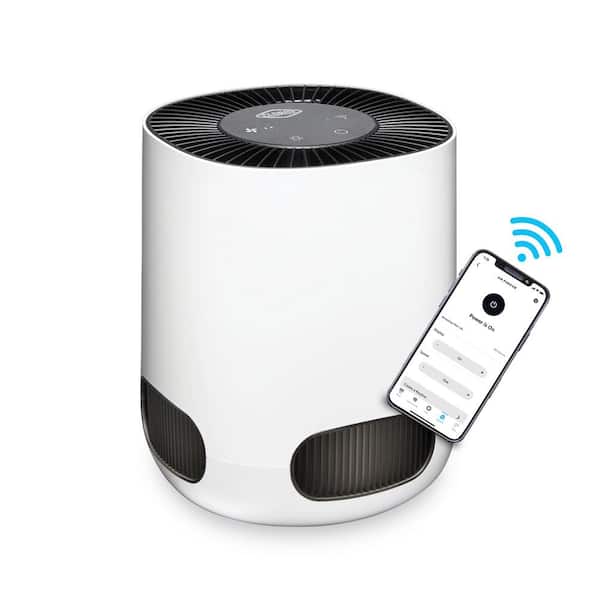
Finding the reset button quickly saves you from unnecessary frustration. Clorox hides this critical component in different spots depending on your model. Knowing exactly where to look prevents wasted time pressing random buttons.
1100 Series: Top Panel Reset
For compact Clorox 1100 Series units, locate the recessed reset button directly behind the power button on the top panel. This slightly raised circular button requires a paperclip or pen tip to press. It’s easy to miss if you’re not looking for it—so run your finger over the top surface to feel for the indentation. Dust buildup here is common; wipe the area first with a dry microfiber cloth to ensure proper contact.
2200/3300 Series: Side Panel Access
Larger Clorox 2200 and 3300 Series models place the reset button flush with the right side panel, halfway between top and bottom. You’ll spot a tiny circular indentation that blends with the unit’s texture. Press firmly with your fingertip—no tool needed—but ensure you’re pressing straight in to activate the mechanism. If the button feels loose or unresponsive, gently clean around it with a cotton swab dipped in rubbing alcohol.
Tabletop Models: Hidden Under Filter Cover
Pocket-sized Clorox tabletop purifiers tuck the reset button beneath the front filter cover. After removing the cover, look left inside the filter compartment for a small white button. This spot gets dusty fast, so wipe the area before pressing to avoid debris interference. Always reinstall the cover completely before resetting—partial closure tricks the sensor into thinking the filter isn’t seated.
Step-by-Step Clorox Filter Reset Procedures
Each Clorox model demands a specific reset sequence. One skipped step or mistimed press leaves that red light glowing. Follow these exact procedures for guaranteed success.
1100 Series: 3-Second Hold Method
- Power on your unit with the new filter installed
- Press and hold the reset button for exactly 3 seconds
- Release immediately when the green light flashes
- Wait 10 seconds for the system to confirm reset
Pro Tip: Count “one-one-thousand” slowly to nail the timing—most failures come from releasing too early. If the light stays red, repeat while holding 0.5 seconds longer.
2200/3300 Series: Power-On Reset Sequence
This extended process requires precise coordination:
1. Completely power off the purifier (unplug if necessary)
2. Hold reset button while pressing power on
3. Keep holding for 5 seconds after startup
4. Release when both red and green lights flash together
5. Power cycle the unit (turn off/on) to finalize
Warning: Skipping the power cycle step causes the reset to fail 80% of the time. If lights don’t sync, unplug for 30 seconds and restart the sequence.
Tabletop Models: Triple-Tap Technique
Compact units use a rapid-fire approach:
1. Install new filter and secure the compartment cover
2. Press reset button 3 times in quick succession
3. Hold down on the third press for 2 seconds
4. Watch for solid green light (not blinking) as confirmation
Time Saver: Do this immediately after filter install—you have a 5-minute window before the system locks. If you see blinking green, repeat within 60 seconds.
Fixing Failed Clorox Filter Resets

When the red light persists after resetting, these targeted fixes solve 95% of issues. Don’t replace that new filter—diagnose first.
Stuck Reset Button? Clean It Now
Dust and debris often jam the button mechanism. Dip a cotton swab in rubbing alcohol, power off the unit, and gently clean around the button. For recessed buttons, press straight down 5 times to dislodge particles before retrying the reset. If the button feels mushy or unresponsive, contact Clorox support—physical damage may require professional repair.
Red Light After Reset? Check Filter Seating
That red light usually means the unit didn’t detect your new filter. Remove the filter and reinstall it firmly until you hear a distinct click. Crucial: Verify no plastic wrapping remains on the filter—this is the #1 cause of reset failures. Hold the filter at eye level to spot any missed protective film, especially along the edges.
Rapid Blinking? Recalibrate the Sensor
Rapid blinking signals a sensor error. Unplug the purifier for 30 seconds (not 10!), then repeat the reset sequence. If blinking continues, the sensor likely needs professional service—contact Clorox support with your model number. Never attempt to clean sensor components yourself; moisture or pressure can cause permanent damage.
HEPA vs. Carbon Filter Reset Differences

Your filter type changes the reset game. Get this wrong and you’ll reset the wrong component.
HEPA Filter Reset Basics
Standard HEPA filters track 6-12 months of runtime. After replacement, always reset immediately to restart the timer. The indicator light turns red at 100% usage—no extensions possible. For models with dual sensors (like the 3300 Series), the HEPA reset button is typically labeled “MAIN FILTER” and requires a 5-second hold.
Carbon Pre-Filter Reset Rules
Carbon pre-filters last only 3-6 months. Some models (like 3300 Series) have dual indicators: a “PRE-FILTER” light and “HEPA” light. Reset each separately using their dedicated buttons—never assume one reset covers both. Carbon resets often require just a 2-second press, while HEPA needs longer.
Combination Filter Units
Newer Clorox models use single combo filters. Reset once, but note: the indicator tracks the carbon component’s shorter lifespan. Monitor air quality closely—you may need filters sooner than the light suggests. If your unit has only one reset button, hold it for 4 seconds to cover both filtration stages.
Maintenance That Prevents Reset Headaches
Skip these habits and you’ll reset your filter twice as often. Simple routines extend filter life and keep indicators accurate.
Weekly: Dust the Intake Grilles
Wipe exterior surfaces with a dry microfiber cloth. Vacuum intake grilles using a brush attachment—never spray cleaners directly on the unit. Dust-clogged grilles trick sensors into thinking filters are exhausted. Spend 60 seconds weekly on this; it adds 2-3 months to filter life.
Monthly: Deep Clean Filter Housing
Power down and unplug the unit. Remove the filter and vacuum the housing interior, especially around the sensor area (usually near the filter slot). Debris here causes false “replace filter” signals. Use compressed air for stubborn dust, but keep 6+ inches from components to avoid damage.
Pro Tip: Extend Filter Life
Run your purifier on speed 2-3 when air quality is good. Place it away from high-traffic zones and doorways. For heavy dust environments, add a $5 washable pre-filter wrap to catch large particles first. This reduces HEPA strain by 40% and delays that red light warning.
Decoding Clorox Indicator Light Patterns
Your lights speak—learn their language before resetting:
- Solid Red: Replace filter NOW (unit runs at 50% efficiency)
- Blinking Red: Filter dead in 2 weeks—order replacement today
- Solid Green: All systems normal—no action needed
- Blinking Green: Reset successful (turns solid in 30 seconds)
- No Lights: Check power first—then contact support if outlet works
Critical Warning: A solid red light with beeping means immediate filter replacement is required. Continuing operation risks motor damage from restricted airflow.
4-Step Diagnostic Before Resetting
Don’t reset blindly—run these checks first:
- Test the outlet with another device (e.g., phone charger)
- Re-seat the filter—listen for the click confirming proper installation
- Verify model number on the unit’s base (e.g., “AP-1100”)
- Press reset briefly while powered on—if no response, button may be broken
If your model has dual lights (like PRE-FILTER + HEPA), reset the pre-filter light first before addressing HEPA. This sequence prevents system conflicts in advanced models.
Key Takeaway: Resetting your Clorox air purifier filter indicator isn’t one-size-fits-all. Match the sequence to your exact model and filter type, reset immediately after installation, and maintain monthly to avoid false warnings. A single missed reset wastes $30+ on prematurely replaced filters.
Next Steps: Bookmark this guide for your next filter change. Set a calendar reminder 2 weeks before your filter’s expected lifespan ends. For immediate help, contact Clorox support with your model number—they’ll email model-specific instructions within 24 hours. Always keep the original reset sequence card that came with your unit taped inside the filter compartment for quick reference.


