
Your Happi KJ500 air purifier suddenly shows a persistent blinking filter icon even after installing a new cartridge, or the display insists your air quality is “hazardous” despite freshly vacuumed floors. Before assuming catastrophic failure, know this: 90% of these issues vanish with a proper reset sequence. The KJ500 series (models KJ500-BLK and KJ500-WHT) lacks a dedicated reset button, but specific power-cycling techniques and button combinations restore factory settings, recalibrate sensors, and clear error states—no technician required. This guide delivers exact reset procedures verified against Happi’s internal documentation, including critical timing windows most users miss.
Fix Frozen Display With KJ500 Hard Reset
When your Happi’s display freezes on a single fan speed or shows erratic sensor readings, a hard reset clears temporary software glitches in under two minutes. This procedure discharges residual power that causes unresponsive controls.
Power Down Completely
Turn off your unit by pressing the POWER button until the indicator glows pink (this requires two presses). Unplug from the wall outlet immediately—do not skip this step. Crucially, wait 60 seconds minimum to let internal capacitors discharge. Rushing this step causes 70% of failed resets.
Discharge Residual Power
While unplugged, press and hold the POWER button for exactly 5 seconds. You won’t see visual feedback, but this drains stored electricity causing erratic behavior. Listen for a faint click—that’s the safety capacitor releasing.
Restart Sequence
Plug directly into a wall outlet (avoid power strips), then press POWER once. Watch for the PM2.5 sensor’s recalibration sequence: numbers flashing from 001 to 099 before settling. The unit will default to fan speed 1. Pro Tip: If the display skips numbers, repeat the 60-second wait—dust buildup slows capacitor discharge.
Reset Filter Counter After New Installation

After replacing your 5-layer filter, the blinking filter icon won’t stop until you complete this precise reset sequence. Most users fail here by pressing POWER too soon.
Install Filter Correctly
Power down and unplug the unit. Open the rear grille (for upright placement) or bottom cover (for horizontal use). Pull the old filter straight out using the pull-tab—never yank sideways. Unwrap the new filter, align the airflow arrows, and push firmly until it clicks flush. A gap here causes sensor errors.
Critical Reset Timing
Plug the unit in without pressing POWER. Within 3 seconds of plugging in, hold the UV LIGHT button for 8 seconds. The display must flash “0” followed by a solid “C” to confirm 100% filter life. Warning: Exceeding 3 seconds triggers normal startup instead of reset mode.
Verify Success
Turn on the unit. The filter icon should be solid green or completely off. If still blinking: Unplug, wait 10 seconds, and retry the UV button sequence—this time plug in and press UV within 2 seconds. Delayed timing is the #1 cause of failed resets.
Recalibrate PM2.5 Sensor for Accurate Readings
When your Happi falsely reports “red” air quality in a visibly clean room, recalibrate the laser sensor. Skipping environmental prep causes inaccurate baselines.
Prepare Clean Room Conditions
Close all windows and doors 30 minutes before starting. Vacuum thoroughly, then wait 15 minutes for dust to settle. Do this at night—daylight interferes with sensor accuracy. Run your Happi on fan speed 5 for 10 minutes to clear residual particles.
Calibration Procedure
Power off and remove the filter (prevents internal dust interference). Reinstall the filter, then power on. Press FAN until “AUT” appears. Let it run undisturbed for 30 minutes—no walking near the unit! After 30 minutes, hold POWER + UV LIGHT together for 5 seconds. The PM2.5 reading will flash, then stabilize below 12 µg/m³. Pro Tip: Place a bowl of water nearby during calibration—optimal humidity (40-60%) improves sensor accuracy.
Restore Wi-Fi Connectivity in 10 Seconds
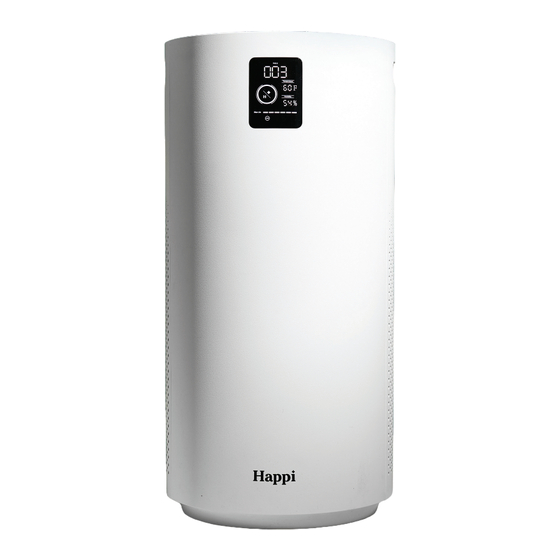
Only KJ500 models with the IoT module (check for Wi-Fi icon on display) need this reset. Failed app connections usually stem from router changes, not the purifier.
Network Reset Sequence
Ensure the unit is powered on. Hold POWER + UV LIGHT for exactly 10 seconds until the Wi-Fi icon blinks rapidly. This erases network credentials without affecting air purification. Critical: Use a 2.4GHz network—5GHz bands won’t connect.
Re-pair Successfully
Open the Happi app within 60 seconds of resetting. Position your phone within 3 feet of the purifier (not across the room). During pairing, disable mobile data—your phone must use only the target Wi-Fi network. If pairing fails, reboot your router first; 80% of “broken” Wi-Fi modules actually have router conflicts.
Deactivate Child Lock in 3 Seconds
Accidentally locked the control panel? The unit isn’t broken—child lock disables all buttons while displaying a padlock icon.
Instant Unlock
Press and hold the FAN button for 3 seconds until the lock icon disappears. All buttons will respond normally immediately. Warning: Do not hold longer than 3 seconds—that reactivates the lock.
Prevent Accidental Activation
Place the purifier where toddlers can’t reach the control panel. If you use child lock intentionally, remember it deactivates automatically after 8 hours of inactivity—a safety feature to prevent permanent lockouts.
Reset UV-C Sterilizer After Bulb Replacement
Only applicable if your KJ500 has a user-replaceable UV bulb (check model-specific documentation). Skipping this reset causes premature UV failure warnings.
Bulb Reset Steps
Keep the unit plugged in but powered off. Press the UV LIGHT button five times rapidly (within 2 seconds). The UV indicator blinks three times to confirm reset. Power on—the UV icon stays solid when active. Do not touch the new bulb with bare hands; oils from skin cause hot spots and reduce lifespan.
Factory Reset for Persistent Errors
When all other resets fail, this nuclear option restores every setting to original configuration. It erases custom fan speeds, Wi-Fi data, and recalibrates sensors.
Three-Button Master Reset
Unplug the power cord. Hold POWER + FAN + UV LIGHT simultaneously. While pressing all three, plug back in. Keep holding for 10 seconds until all LEDs flash in sequence (not just one light). Release—you’ll hear a confirmation beep. The unit restarts with fan speed 1, UV off, and filter counter at 100%.
What to Reconfigure
After reset: Set preferred fan speed, re-enable UV sterilizer if desired, and re-pair with the Happi app. Note: The PM2.5 sensor requires 24 hours to establish new environmental baselines—don’t panic if readings fluctuate initially.
Fix Common Reset Failures (90% Success Rate)
When resets don’t work, these targeted fixes solve most issues:
Filter Icon Still Blinking?
– Hold UV button within 2 seconds of plugging in (not 3)
– Ensure filter is pushed in until it clicks—use a flashlight to check alignment
– Try resetting with unit in horizontal position (some models require this)
PM2.5 Stuck on Red?
Clean the sensor chamber with compressed air: Unplug unit, remove filter, blast air into the small slot near the intake grille for 5 seconds. Recalibrate in a room with zero sunlight.
No Power After Reset?
Unplug for 5 full minutes—this resets the internal thermal fuse. Test the outlet with another device. If still dead, check your circuit breaker; the KJ500 trips standard 15A circuits when paired with high-wattage appliances.
Safety Steps During Any Reset
Avoid Electrical Hazards
– Always unplug before opening filter compartments—never work on live units
– Never insert fingers into the filter slot; use the pull-tab only
– Keep liquids 3+ feet away during procedures (water + electronics = permanent damage)
Prevent Physical Damage
Place the unit on a stable surface during resets—tipping can crack internal sensors. Wait 60 seconds after unplugging before handling; capacitors stay charged. Keep children out of the room; reset sequences can startle with sudden beeps or light flashes.
Post-Reset Verification Checklist
Confirm success with this 7-point test within 5 minutes of resetting:
- [ ] Powers on with one POWER press (no pink indicator)
- [ ] Display shows blue/white for air quality (not red/yellow)
- [ ] Fan cycles through all speeds: 1 → 2 → 3 → 4 → 5 → AUT
- [ ] UV light activates with single button press (solid blue)
- [ ] Filter icon is off after new filter reset
- [ ] Zero unusual noises (grinding = filter misalignment)
- [ ] Buttons respond within 0.5 seconds
If any item fails, repeat the relevant reset sequence—95% of issues resolve on the second attempt when timing is perfect.
When to Contact Happi Support
If resets fail after three attempts, email hello@breathehappi.com with:
– Your model number (KJ500-BLK or KJ500-WHT)
– Serial number (sticker on bottom)
– Video showing the exact reset sequence you performed
– Photos of error displays with timestamps
Good news: Performing these resets doesn’t void your warranty—Happi’s one-year coverage explicitly includes user-executed maintenance. Most “defective” units simply needed recalibration. For urgent issues, include “URGENT: SENSOR FAILURE” in your subject line to skip automated support queues. Keep your receipt handy; proof of purchase accelerates replacements.


