That new Bionaire air purifier box is calling your name, promising relief from allergies, pet dander, and stubborn odors. But between the filters, buttons, and settings, you’re stuck wondering where to begin. Don’t worry—within minutes, you’ll master every function and have your indoor air quality transformed. This complete guide to how to use Bionaire air purifier walks through everything from first setup to advanced scheduling, ensuring you get maximum performance from day one.
Your Bionaire isn’t just another appliance—it’s your home’s air quality guardian. Skip these crucial steps, and you’ll waste money on ineffective operation or even damage your unit. Let’s turn that unopened box into your secret weapon against poor indoor air.
Unboxing and First Setup
Essential Components Check Before Installation
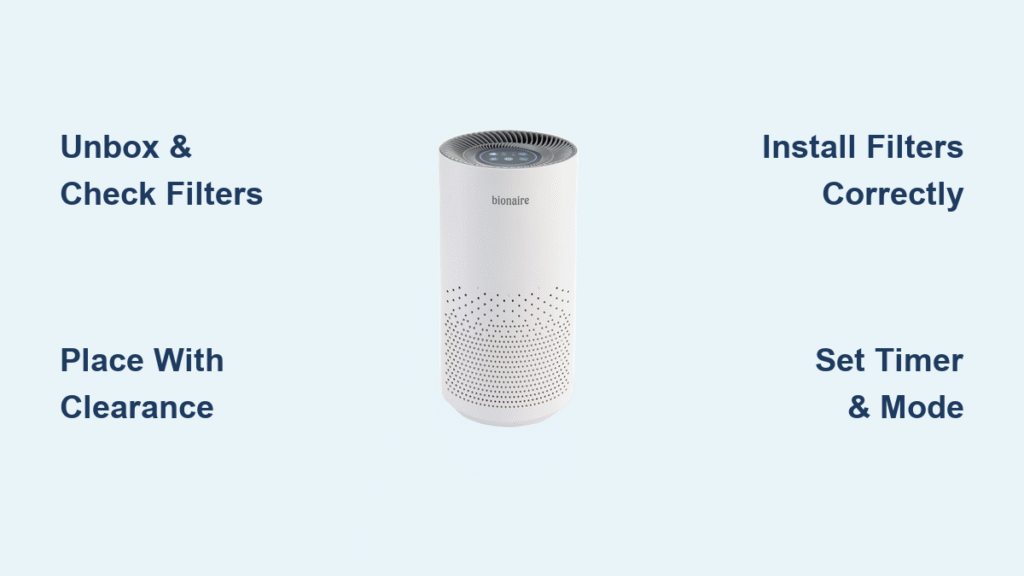
Before plugging in your Bionaire, verify you have all components: main unit, pre-filter, HEPA filter, activated carbon filter, user manual, and remote control (for select models). Running without proper filters damages the motor and voids your warranty. Missing a filter? Contact customer service immediately—never operate your unit without complete filtration.
Strategic Placement for Maximum Airflow
Position your unit on a flat surface with 2-3 feet clearance on all sides—this isn’t optional but the minimum distance required for proper air intake and exhaust. Avoid placing near radiators, direct sunlight, or moisture-prone areas like bathrooms. Your outlet must provide standard 120V AC power; extension cords reduce efficiency and create fire hazards. If absolutely necessary, use only a heavy-duty 14-gauge cord under 6 feet long.
Critical Filter Preparation Steps
Remove ALL plastic packaging from filters before operation—this is the #1 mistake new users make. That thin plastic sleeve completely blocks airflow and will burn out your motor within hours. Each filter has directional arrows indicating airflow direction; note these now for easier replacement later. Never skip this step when learning how to use Bionaire air purifier correctly.
Powering On Your Bionaire
First Startup Sequence for Optimal Performance
Connect the power cord to a grounded outlet and press the power button—typically on the top panel or front display. Your unit responds with a single beep and illuminated indicator lights. Expect a slight odor during the first 24-48 hours as new filter materials off-gas—this is normal and disappears quickly. Never operate without filters installed, as this damages internal components.
Control Panel Functions Decoded
Every button serves a specific purpose in your air cleaning mission. The power button provides instant on/off control. Speed control cycles through 3-5 settings from whisper-quiet to turbo. The timer programs 2, 4, 8, or 12-hour auto-shutoff. The filter reset button clears replacement indicators after filter changes. Mode selection switches between Manual, Auto, and Sleep modes—master these to maximize your how to use Bionaire air purifier experience.
Speed Settings for Every Situation
Your Bionaire offers strategic speed options: Low Speed runs at 20-30 dB—quieter than a whisper, perfect for bedrooms. Medium Speed balances noise and cleaning power for daily use (most users stay here 80% of the time). High Speed activates during cooking or when outdoor air quality drops. Turbo Mode (on select models) delivers maximum cleaning for rapid air purification. Sleep Mode dims display lights and drops to ultra-quiet operation while maintaining air circulation.
Filter Installation Guide
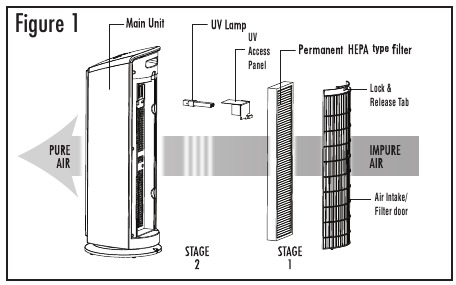
Identifying and Installing Your Filter Types
Your Bionaire uses a multi-stage filtration approach: The pre-filter is a washable mesh capturing hair and large dust. The True HEPA filter removes 99.97% of particles down to 0.3 microns. The activated carbon filter absorbs odors and VOCs. Some premium models include UV-C light for germicidal action. Each filter must be installed in the correct order for proper function—never omit any stage when learning how to use Bionaire air purifier.
Step-by-Step Filter Replacement Process
When indicator lights signal replacement time, follow this exact sequence: Unplug the unit and wait 5 minutes (capacitors hold charge). Remove front or rear panel (varies by model). Note old filter orientation before removal. Unwrap new filters completely—every plastic layer must go. Insert following directional arrows on filter frame. Secure panel firmly—loose panels cause rattling. Press and hold filter reset button for 3-5 seconds until indicator resets.
Filter Replacement Schedule Mastery
Mark your calendar with these critical intervals: Pre-filter needs cleaning every 2-4 weeks and replacement every 3-6 months. HEPA Filter requires annual replacement under normal use, extending to 12-18 months for light use. Carbon Filter must be swapped every 6-12 months depending on odor levels. UV-C bulb (if equipped) needs annual replacement to maintain germicidal effectiveness. Ignoring these schedules drastically reduces how to use Bionaire air purifier effectiveness.
Advanced Features Explained
Auto Mode Intelligence for Hands-Free Operation
Built-in air quality sensors eliminate guesswork—your unit continuously monitors particles and automatically adjusts fan speed. LED indicators communicate air status: Solid Blue means excellent air quality (minimal fan speed), Yellow Glow indicates moderate pollution (increased cleaning), and Red Alert signals high contamination (maximum purification). Sensor sensitivity can be adjusted for your specific environment—urban apartments need higher sensitivity than rural pet-friendly homes.
Timer Programming for Strategic Cleaning
The timer function creates targeted cleaning schedules: Set 2-hour cycles for post-cooking cleanup, 4-hour sessions for bedroom pre-sleep purification, or 12-hour overnight operation. Wi-Fi enabled models offer weekday/weekend programming for automated daily routines. This feature transforms how to use Bionaire air purifier from constant operation to strategic, energy-efficient cleaning.
Room-Specific Usage Tips

Sizing Your Space for Optimal Performance
Match your model to room dimensions: Small rooms (100-200 sq ft) need compact desktop models. Medium spaces (200-400 sq ft) require tower units balancing power and footprint. Large areas (400-600 sq ft) demand console units for maximum coverage. Calculate your CADR needs: Room square footage × 0.75 = minimum Clean Air Delivery Rate required. Undersized units run constantly without achieving desired air quality.
Strategic Positioning Secrets by Room Type
Place your Bionaire near pollution sources for maximum impact: Kitchen placement tackles cooking odors. Pet areas benefit from targeted fur removal. Elevate 3-5 feet for optimal air circulation. In bedrooms, position 6-10 feet from your bed—close enough for clean air, far enough to avoid direct airflow causing stuffiness. Proper positioning is half the battle when learning how to use Bionaire air purifier effectively.
Troubleshooting Performance Issues
Solving Common Air Purifier Problems
When your Bionaire underperforms, diagnose systematically: Reduced airflow almost always indicates clogged filters or blocked vents—check pre-filter debris first. Unusual noise typically stems from improper leveling or foreign objects—ensure the unit sits flat. Persistent odors signal carbon filter saturation—replace immediately as these filters can’t be cleaned. Electrical failures require outlet verification first—test with another device before assuming unit failure.
Decoding Error Light Patterns
Your Bionaire communicates problems through light patterns: Blinking red light means filter replacement overdue. Continuous beeping indicates thermal protection activation—check ventilation clearance. Dead display suggests control board glitch—unplug for 30 seconds to reset. Sensor errors require cleaning sensor windows with a soft, dry cloth monthly. Understanding these signals is critical to mastering how to use Bionaire air purifier.
Maintenance Mastery
Weekly Quick Cleaning Routine
Spend just 5 minutes weekly maintaining peak performance: Wipe exterior with barely damp cloth—never spray cleaners directly. Vacuum intake and outlet grilles using brush attachment. Check pre-filter for visible debris accumulation. Monitor indicator lights for early warning signs. Consistent maintenance prevents major issues and extends how to use Bionaire air purifier effectiveness.
Monthly Deep Service Protocol
Monthly maintenance prevents costly repairs: Unplug completely and move to well-lit area. Remove pre-filter and wash with mild soap—air dry completely. Use soft brush attachment to clean interior surfaces gently. Inspect all filters for damage. Clean sensor windows with microfiber cloth. Check cord condition—fraying or kinks require immediate replacement.
Energy Efficiency Optimization
Understanding Power Consumption Patterns
Your Bionaire’s electrical appetite varies dramatically: Low speed uses 15-25 watts (less than LED bulbs). Medium speed consumes 35-50 watts (similar to laptop charging). High speed draws 50-75 watts (comparable to ceiling fans). Annual operating costs range $25-75 depending on local rates and usage patterns—smart usage keeps costs minimal while maintaining how to use Bionaire air purifier performance.
Smart Energy Practices for Cost Savings
Maximize cleaning while minimizing costs: Program operation during off-peak electricity hours. Clean filters regularly to maintain airflow efficiency. Close windows and doors during operation to prevent wasted effort. Use appropriately sized models to prevent overworking smaller units. These strategies optimize how to use Bionaire air purifier without inflating your electricity bill.
Safety Protocols
Electrical Safety Essentials
Your air purifier demands respect for electrical safety: Use only properly grounded outlets—three-prong plugs exist for safety. Avoid extension cords—fire hazards and efficiency killers. Keep away from water sources like sinks. Unplug during electrical storms—power surges damage sensitive electronics. Monthly cord inspection catches damage before failures occur. Safety first when learning how to use Bionaire air purifier.
Operational Safety Rules for Families
Protect your household with these guidelines: Never insert objects into air vents—curious children and pets included. Position cords to prevent tripping hazards. Don’t operate with damaged or missing filters. Keep control panels accessible but out of children’s reach. Following these protocols ensures your how to use Bionaire air purifier experience remains safe and effective.
Your Bionaire transforms from mysterious box to trusted home companion through these systematic steps. Start with proper placement, master the control functions, establish maintenance routines, and soon you’ll wonder how you lived without it. Clean air isn’t a luxury—it’s your new daily reality when you know exactly how to use Bionaire air purifier to its full potential.